
cmux
The terminal built for multitasking, organization, and programmability.
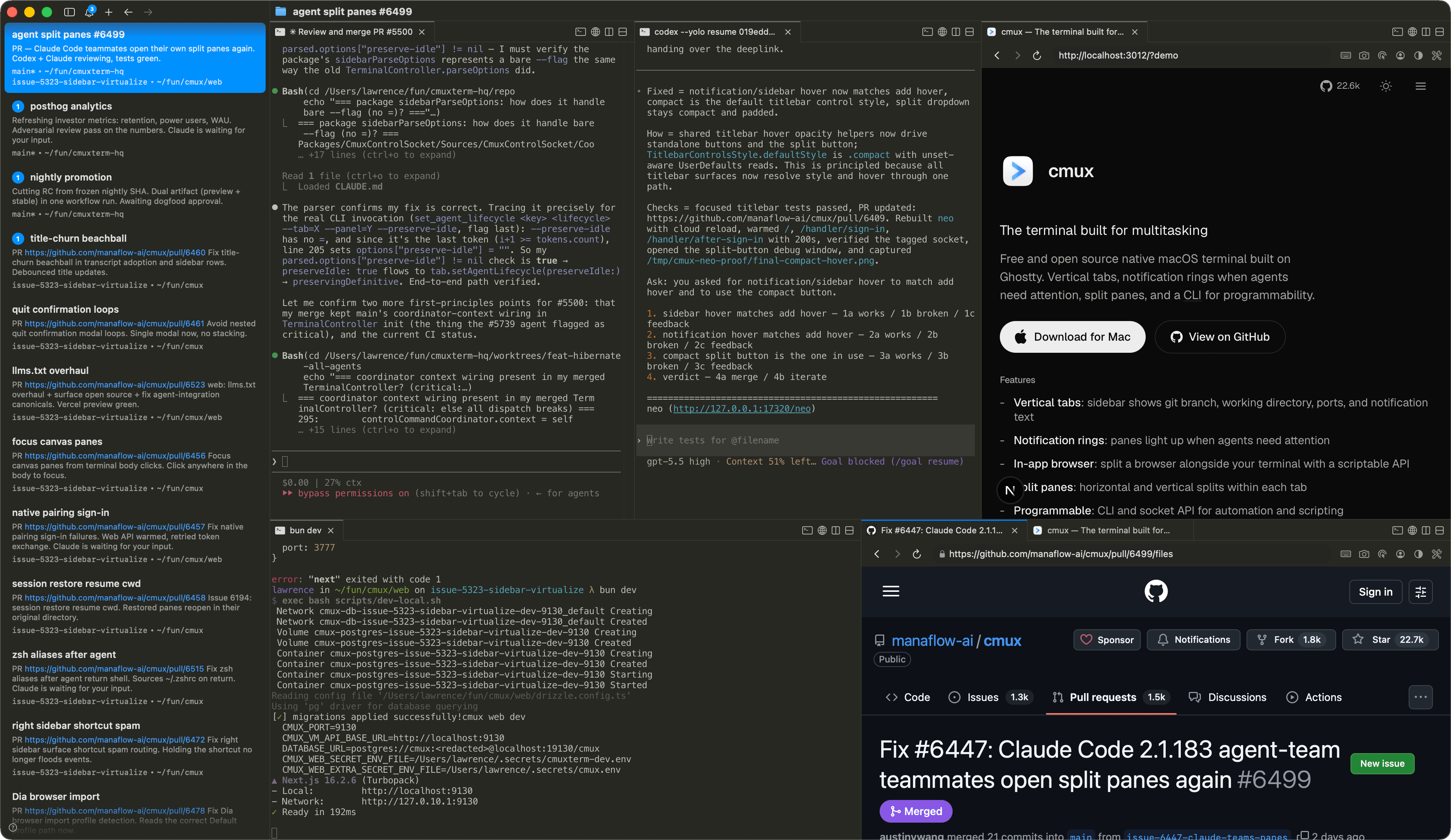
Free and open source native macOS terminal built on Ghostty. Vertical tabs, notification rings when agents need attention, split panes, and a CLI for programmability.
Features
- -Vertical tabs: sidebar shows git branch, working directory, ports, and notification text
- -Notification rings: panes light up when agents need attention
- -In-app browser: split a browser alongside your terminal with a scriptable API
- -Split panes: horizontal and vertical splits within each tab
- -Programmable: CLI and socket API for automation and scripting
- -GPU-accelerated: powered by libghostty for smooth rendering
- -Lightweight: native Swift + AppKit, no Electron
- -Open source: free and GPL-licensed
- -Keyboard shortcuts: extensive shortcuts for workspaces, splits, browser, and more
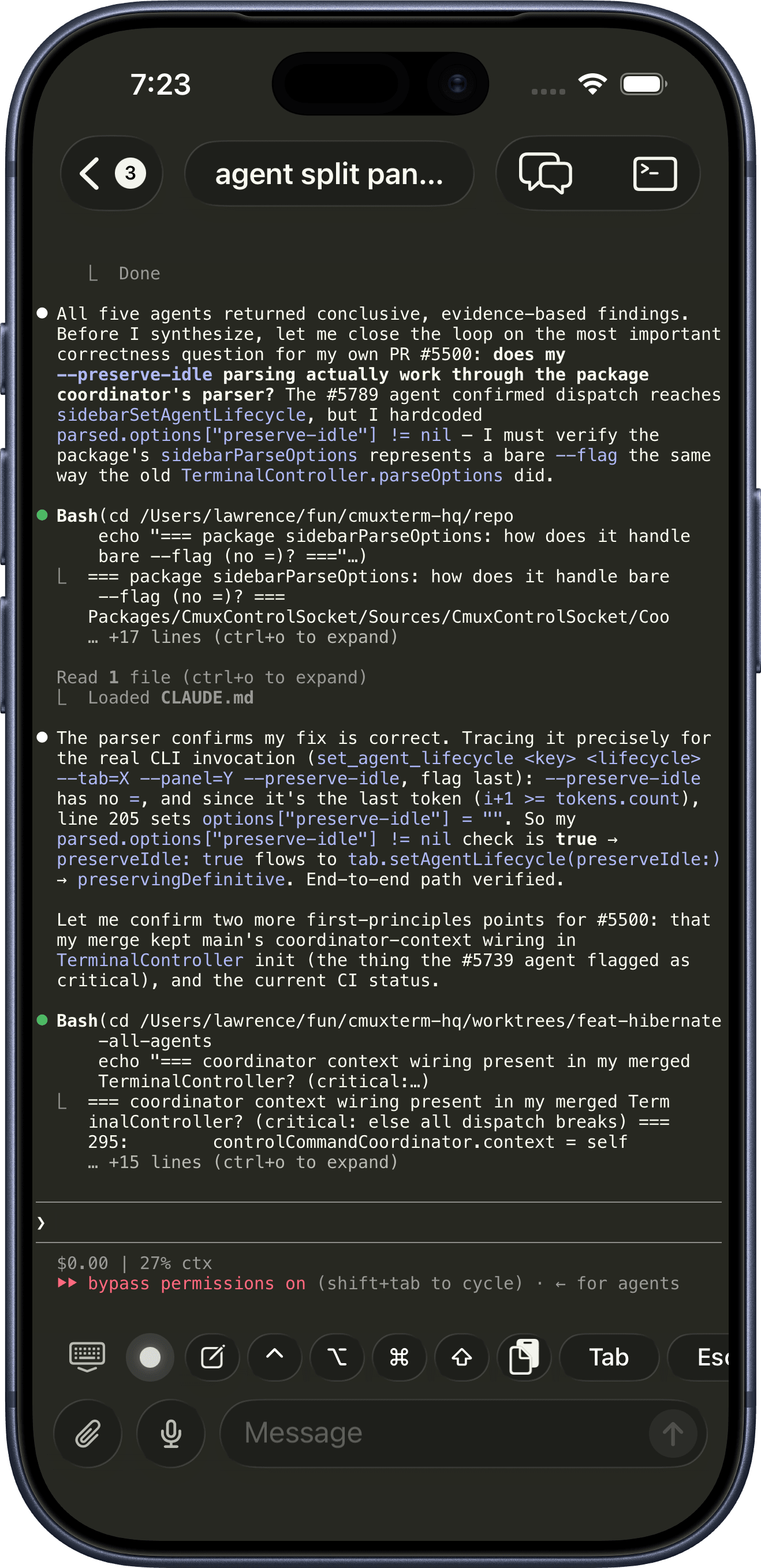
- -iOS companion: your terminals sync to iPhone and iPad in realtime
FAQ
How does cmux relate to Ghostty?
cmux is not a fork of Ghostty. It uses libghostty as a library for terminal rendering, the same way apps use WebKit for web views. Ghostty is a standalone terminal; cmux is a different app built on top of its rendering engine.
What platforms does it support?
Open the Download menu to see available cmux builds. for any platform that is not released yet.
Is there an iOS app?
Yes, in beta. Pair your iPhone with your Mac from the Mobile Connect window and attach to your terminals from your phone, with optional forwarding of terminal notifications. It ships on TestFlight as cmux BETA. Early access is included with cmux Founder's Edition.
What coding agents does cmux work with?
All of them. cmux is a terminal, so any agent that runs in a terminal works out of the box: Claude Code, Codex, OpenCode, Gemini CLI, Kiro, Aider, Goose, Amp, Cline, Cursor Agent, and anything else you can launch from the command line.
Can cmux orchestrate multiple agents and subagents?
Yes. When an agent spawns subagents or teammates, cmux turns them into native panes and splits instead of hidden background processes. It supports Claude Code teams and oh-my-opencode multi-model orchestration, so every agent in a run is visible and controllable.
Can I use cmux with remote machines?
Yes. Open workspaces over SSH and attach to remote tmux sessions, so agents can run on a remote host while you drive them from cmux. See SSH and remote.
How do notifications work?
When a process needs attention, cmux shows notification rings around panes, unread badges in the sidebar, a notification popover, and a macOS desktop notification. These fire automatically via standard terminal escape sequences (OSC 9/99/777), or you can trigger them with the cmux CLI and agent hooks. Any agent that supports hooks or OSC works, including Claude Code, Codex, OpenCode, and pi.
Is cmux programmable?
Yes. Every action is available through the cmux CLI and a Unix socket: create workspaces, open split panes, send input, read screen contents, take screenshots, and drive the in-app browser. See the CLI reference and browser automation docs.
What can the built-in browser do?
cmux can split a real browser pane next to your terminal, and it is fully programmable: navigate, snapshot the DOM, click, type, evaluate JavaScript, and read console and network activity over the same socket API. Agents use it to verify their own web changes without leaving cmux. See browser automation.
Does cmux have skills?
Yes. Skills are reusable workflows you can give any agent running in cmux, for things like CLI control, workspace automation, settings, and browser surfaces. Browse the open collection at cmux-skills, or read the skills docs.
Can I customize keyboard shortcuts?
Terminal keybindings are read from your Ghostty config file (~/.config/ghostty/config). cmux-specific shortcuts (workspaces, splits, browser, notifications) can be customized in Settings. See the default shortcuts for a full list.
Can I customize cmux?
Yes. Terminal rendering uses your Ghostty config, so themes, fonts, colors, and cursor carry over directly. cmux's own settings in ~/.config/cmux/cmux.json control the sidebar, tab bar, split panes, and behavior, and every keyboard shortcut is editable. See configuration.
Are my sessions saved?
Yes. cmux restores your windows, workspaces, panes, working directories, and scrollback when you relaunch, and the state survives a full computer restart, not just quitting the app. Agent sessions like Claude Code, Codex, and OpenCode come back too. See session restore.
How does it compare to tmux?
tmux is a terminal multiplexer that runs inside any terminal. cmux is a native macOS app with a GUI: vertical tabs, split panes, an embedded browser, and a socket API, all built in, no config files or prefix keys needed. That said, lots of people happily run cmux with SSH and tmux together, and cmux can attach to your remote tmux sessions natively (beta).
Is cmux free?
Yes, cmux is free to use. The source code is available on GitHub.
How can I support cmux?
cmux is free and open source, and always will be. If you want to back development and get early access to what's next, including cmux AI, the iOS app, and Cloud VMs, check out cmux Founder's Edition.
I have a feature request or found a bug
We want to hear it. Open an issue or pull request on GitHub, or email us.
Community
- "Another day another libghostty-based project, this time a macOS terminal with vertical tabs, better organization/notifications, embedded/scriptable browser specifically targeted towards people who use a ton of terminal-based agentic workflows." —
 Mitchell Hashimoto, Creator of Ghostty and founder of HashiCorp
 - "I'm late to the party, but cmux is great. Current split: Codex Mac app for knowledge work, learning, reading; cmux + Codex CLI for coding." —
 Peter Steinberger, OpenClaw creator. Founder of PSPDFKit.
 - "This is exactly the product I've been looking for. After two hours this am I've in love." —
 Nick Schrock, Creator of Dagster. GraphQL co-creator.
 - "I've been using this all weekend and it's amazing." —
 Edward Grefenstette, Director of Research at Google DeepMind
 - "> learn cmux
> trust me" —
 David Ondrej
 - "this has been my favorite tool for past two weeks" —
 Max Forsey
 - "아직 늦지 않았어요. 저도 Ghostty 많이 쓰는데 이어서 cmux도 사랑입니다. 세로 탭, 알림 링, 내장 브라우저, 분할 패널, GPU 가속 등등.. 정말 이점이 많아요!" — It's not too late. I use Ghostty a lot, and cmux is love too. Vertical tabs, notification rings, built-in browser, split panes, GPU acceleration... there are so many real benefits! —
 lucas
lucas - "cmux しばらく使ってみたが好きだな めちゃくちゃ良いというよりは、あーこれだわこれ、という感触 k1Low/moとの相性も良い" — I've used cmux for a while and I like it. It feels less like 'this is amazing' and more like 'yes, this is it.' It also pairs well with k1Low/mo. —
 yamadashy / やまだし
 - "我也主力用 cmux,还推荐给其他同事,原因就是通知系统,分工作区,快捷键好用,多工作并行时能提高效率,尽管 cmux 比较丑,但它的功能让我不得不用它。" — I also use cmux as my main terminal and recommend it to coworkers. The notifications, workspaces, and shortcuts improve efficiency when running multiple jobs in parallel. Even though cmux is a bit ugly, its functionality makes it indispensable. —
 minixalpha
 - "Tuve algún tema con el navegador pero cmux es insustituible en mi día a día." — I had an issue with the browser, but cmux is indispensable in my day to day. —
 Juan Barbat
 - "اقتراحي هو استعملوا Cmux وخلاص... فك لي ازمة بكل شيء تقريبًا من ناحية التيرمنل" — My suggestion is just use cmux. It solved almost every terminal problem for me. —
 Yousef Rol
 - "Hab mir gerade cmux installiert, hab bisher ghostty genutzt. Aber cmux ist nochmal besser für KI Agenten und Coding geeignet." — I just installed cmux. I had been using Ghostty, but cmux is even better suited for AI agents and coding. —
 Tobias Glöckler
 - "po nao sei como vivi tanto tempo sem cmux" — Man, I don't know how I lived so long without cmux. —
 Wesley
 - "요즘 최애 터미널 cmux. 개인적으로 멀티 터미널 돌리기 너무 좋은거 같아" — cmux is my favorite terminal lately. Personally, I think it's really good for running multiple terminals. —
 ub:)ub 🎗️
 - "cmux 良さそうすぎてついにバイバイ VSCode するときなのかもしれない" — cmux looks so good it might finally be time to say goodbye to VSCode —
 あさざ
あさざ - "eğer birden fazla terminal ile çalışmanız gerekiyorsa kesinlikle cmux'u denemelisiniz. terminal sizden bir cevap beklediğinde otomatik bildirim geliyor." — If you need to work with multiple terminals, you should definitely try cmux. When a terminal waits for your input, it sends an automatic notification. —
 Şerafettin Sarışen
 - "最近用的最多的终端工具就是这个 cmux,开源免费。基本上代替 iTerm2 了。完美解决了多终端窗口排列问题。" — cmux is the terminal tool I use most lately. It's open source and free. It has basically replaced iTerm2 for me and perfectly solves the multi-terminal window layout problem. —
 金尘马
金尘马 - "Я уже какое-то время назад на него переехал с warp и как будто пересел на ракету. Он написан нативно для Mac OS на Swift и его супер активно развивают." — I moved to it from Warp a while ago and it felt like switching to a rocket. It's native macOS Swift and being developed super actively. —
 Закиев Василь
 - "推荐一个最近喜欢用的工具: cmux,不用频繁切换终端窗口了" — A tool I've liked using recently: cmux. I no longer have to switch terminal windows constantly. —
 Mazzystar
 - "Hey, this looks seriously awesome. Love the ideas here, specifically: the programmability, layered UI, browser w/ api. Looking forward to giving this a spin. Also want to add that I really appreciate Mitchell Hashimoto creating libghostty; it feels like an exciting time to be a terminal user." —johnthedebs
- "Vertical tabs in my terminal 🤤 I never thought of that before. I use and love Firefox vertical tabs." —
 Joe Riddle
 - "Gave this a run and it was pretty intuitive. Good work!" —dchu17
- "I like it, ran it in the past day on three parallel projects each with several worktrees. Having this paired with lazygit and yazi / nvim made me a bit more productive than usual without having to chase multiple ghostty / iTerm instances. Also feels more natural than tmux." —afruth
- "cmux良さそうなので入れてみたけれど、良い" — Tried cmux since it looked good — it's good —
 Norihiro Narayama
 - "cmux is pretty good." —
 Kishore Neelamegam
 - "cmux.dev に乗り換えた" — Switched to cmux.dev —
 かたりん
かたりん - "This has been such a useful find. I can't recommend it enough." —
 Scott Watermasysk
 - "grabbed this over the weekend and loved it. been waiting for something like this." —
 John Blythe
 - "This is exactly what I've wanted. Amazing job thank you!" —
 Christopher
 - "Been using this for a week and it's fantastic. Vert tab for each WIP task. Inside, claudes on one side and browser with PR and resources on the other, switch between tasks and stay organized. Mix that with skills to have Claude watch CI recursively, etc. feeling enlightened tbh" —
 Connor
 - "年初にWarpからGhosttyに乗り換えたけど、今はcmuxに乗り換えた💻 垂直タブが便利で、Claude Codeのタスクの終了が通知されるのがありがたい。Ghosttyベースだから爆速動作はそのまま。ghosttyでやったブランチ表示や補完もそのまま使える" — I switched from Warp to Ghostty at the start of the year, but now I've switched to cmux. The vertical tabs are convenient, and I appreciate getting notified when Claude Code tasks finish. It's Ghostty-based so the blazing fast performance carries over. Branch display and completions I set up in Ghostty still work too. —
 鹿野 壮 Takeshi Kano
More cmux builds are on the way.